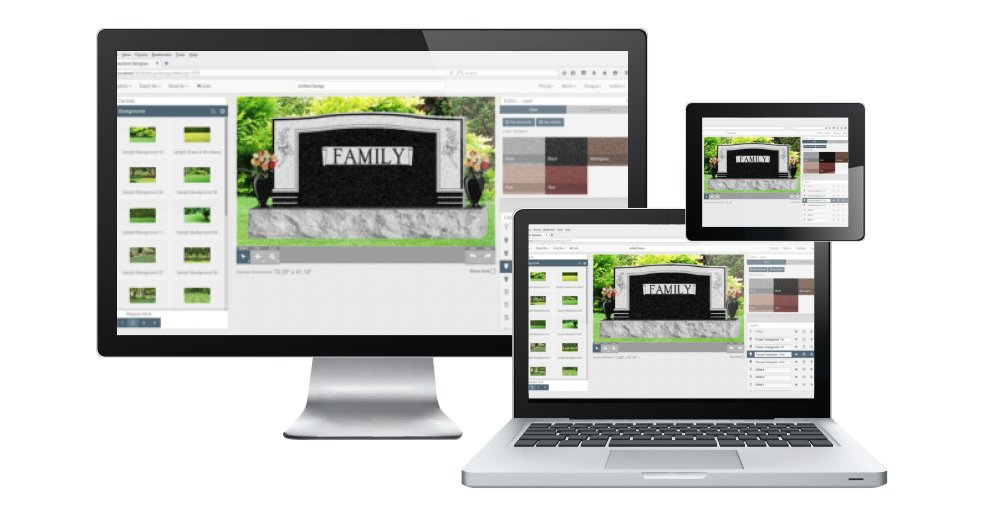
Online Monument Designer & Online Monument Catalog

blue bar
All new!
Online Monument Designer and Online Monument Catalog! 

Design Mart's new Online Monument Designer and Online Monument Catalog allow you and your customers to draw designs and email them instantly or search our catalogs for the ideal monument design.  Retailers, manufacturers and families are using these new online tools to communicate and design monuments that preserve the memories of loved ones.  Please scroll down for a few success stories and information on features, subscription prices, free demos, etc.

blue bar

Online Monument Designer Keeps Business Moving During Recent Floods

McDonald'sSpacerWhen heavy rains fell earlier this month in Kentucky families lost loved ones, farmers lost crops, and residents and business owners were completely flooded.

When Ilene recently found her office flooded at Restlawn Memory Gardens she took her laptop computer to a nearby McDonald's that offered wireless internet, and she continued helping her clients.

"Our office was under six inches of water," she says.  "It destroyed our computer and phone system, and our internet service was down for 10 days."

A local McDonald's had a WIFI Signal, so she ordered coffee and designed monuments for clients who were waiting for approval drawings.

"I worked until 11:00 one night with the cleaning crew sweeping around me," Ilene adds.  "I even turned one of the employees into a customer who decided to purchase a monument."

Since Design Mart's Monument Designer is online she didn't have to be in the office to have access to the designs or catalogs.

"I worked some odd hours in a strange location - with a small audience watching over her shoulder at times," Ilene says.  "However, I was able to create the monument designs I needed until the waters receeded and I could return to my office."

Online Monument Designer Helps Close Sale

Design Mart recently got an email from Cole Brown at Natchez Monument Company, and he said:

"Thank you Design Mart!  Your software helped me sell this monument which really helps with contemporary designs.  At Natchez Monuments we like new shapes, plus mixing and matching granite colors.  Thanks again, and keep up the great work!"

We like to hear from customers like Cole who have been successful with our Online Monument Designer.  While it does provide a number of contemporary shapes there are plenty of traditional shapes for you and your customers to choose from.  Check out the photos below to see how the monument looked when Cole created it in the Online Monument Designer (left), and then you'll see how close the actual stone turned out (right).

Natchez Rendering Natchez Monument

A report is automatically generated when each design is finished and emailed.  All DMart carving numbers needed for the design are detailed in the report, so the finished design looks exactly like the one pictured in the Monument Designer.  Email d-mart@designmart.com or call 800-736-7455 for a free trial today!

blue bar 

Online Monument Designer

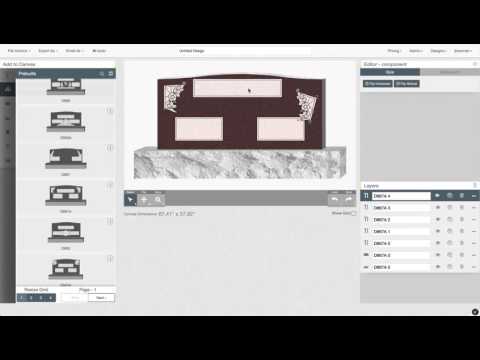
You Tube LogoClick here to watch how easy it is on YouTube!  Part 2

Online Monument Designer

The Online Monument Designer lets you choose from more than 100 monument shapes and more than 200 carvings.  The personalized login makes the Monument Designer look like it's your very own - with your company name at the top of the screen and on the final report.  When you've finished designing and lettering your monument design you may view it in five colors of granite and email it to yourself, your customers or your supplier.  A Summary Report is automatically generated - detailing the names of the CAD carvings* and lettering fonts used in the design.  Retailers are finding it helpful to give a User Name and Password to customers who would like to design their own monuments.  Others are designing monuments and emailing them to families for approval while sending the same design to a manufacturer for an estimated cost and delivery time.  

It's Here, And It's Easy - Precious Memories Monument Series Added To Online Monument Designer.  Try It Free Today!

You Tube LogoClick here to watch how easy it is on YouTube! Part 2 
 

Precious Memories for Online Catalog

Many visitors to our Online Catalog & Monument Designer have enjoyed  building their own monuments, but many visitors feel they simply don't have the creativity or time to design their own.  For those who would like a selection of classic monuments to choose from we've added our Precious Memories series - and all a user has to do is add names and dates.  After adding text, the monument may be placed on a photographic background, and the stone may be viewed in five different granite colors.  Then the image is sent by email to the user, and a copy may be sent to the family, retailer, or manufacturer - making it possible to see exactly how the completed monument will look.

The Precious Memories series features 59 monument designs including companion monuments, family monuments, wint/vase monuments, individual monumenets, markers (slants, bevels and flats), ledgers and children's monuments.

No CAD experience is required, and the Designer is completely web-based.  Anyone with an internet connection can use it.  Free trials are available to any retailer, wholesaler or manufacturer.  Please email d-mart@designmart.com or call 800-736-7455 for your free user name and password today.  

Click here to watch a brief video of the Online Monument Designer.  This video is short, but it is still a large file.  Please be patient.  Please scroll down the page for a helpful section featuring design ideas and helpful questions and answers.

*CAD carvings featured in the Online Monument Designer are all featured in vector artwork DMart Disk3/Classic Components.  The Online Monument Designer is for creating monument renderings only and does not produce a file for stencil cutting.  DMart Disk3-Classic Components mentioned in each Summary Report may be used for stencil cutting.

All New!  A Closer Walk Now Available In Online Monument Designer

Design Mart's popular series, A Closer Walk, is now available as part of Design Mart's Online Monument Designer & Catalog.  The series joins Precious Memories and Ties That Bind in the selection of preformatted monument designs that are available for quick and easy customization.

When visiting the Online Monument Designer & Catalog users may browse all of the Design Mart catalogs and print pages from them, or they may click the Design Your Own button to create a customized monument.  After users enter the Online Monument Designer they may choose to add names and dates to preformatted designs from Precious Memories, A Closer Walk, and Ties That Bind, or they may build a unique monument design from scratch by choosing from more than 100 blank monument shapes and more than 200 carvings, emblems and panels.

Online Monument Designer A Closer Walk

After a monument design has been completed users may place the monument image on a variety of photographic backgrounds and then view the design in five different colors of granite - gray, pink, red, black and mahogany.

Online Monument Designer A Closer Walk Marker 

The Online Monument Designer is a quick and easy way to create renderings for customer approval.  An email report is automatically generated, which gives detailed information on CAD files needed for cutting sandblast stencil.  The rendering shown above was created in about three minutes using the new A Closer Walk series.  Design Mart's Online Monument Designer & Catalog operates within most popular web browsers, so there is no special software to download.  No CAD software is involved so there is no lengthy training or expensive application to purchase.

Contact Design Mart today for a free trial, or learn more by scrolling down - where you will see subscription information and links to helpful YouTube videos that will show the Online Monument Designer & Catalog at work.

Online Catalog
You Tube LogoClick here to watch how easy it is on YouTube!
Design Mart Online Catalog

Design Mart's Online Monument Catalog features a personalized login that places your company name at the top of the screen.  Whether you're using it in your office, in the home, or if you customers are using it at home, it looks like it is your very own Online Monument Catalog.  It's ideal for families who have other family members far away who would like to look at the same monument designs.  Finally there is a way for you, your customer, your customer's family and your manufacturer to look at the same monument design at the same time.

Click here to watch a brief video of the Online Monument Catalog.

Click here to visit the login page and enter your User Name and Password.

onlinedbaseofficewhitenudge 

Monument Retailers:
- Share your subscription with your customers so families living in different areas can browse designs together and contact you for an estimated cost and delivery time.
- Share your subscription with your wholesaler or manufacturer so they can browse your design selections and avoid costly mistakes and delays.

Monument Wholesalers & Manufacturers:
- Share your subscription with your retailers to help them (and their families) identify the ideal monument design.
- Share your subscription with your entire sales team to give your employees access to thousands of searchable monument designs, carving identification numbers and sizes.

onlinedbasecouple 

Families:
- Share a subscription with other family members, and browse monument designs in the comfort of your home. Discuss your thoughts and selected design numbers with others, so they can browse. Share your decision with your monument retailers for a quick and easy estimate.
 

So Many Ways To Search:
Click image below for larger preview.

onlinedbasesearchwhitenudge

Search by the Book/Catalog -
View the entire contents of your favorite books - from "Precious Memories" to our latest, "We Remember."

Search by Design Number -
Need to look at a design and you only have the number? Search by design number and find it in seconds.

Search by Family Name -
Do you have a family name, but no design number? Type in the family name and go right to it.

Search by Monument Type -
Would you like to see only flat markers? Search flat markers and preview more than 200 of them with one click. Search for uprights, wings, bevel markers, flat markers, slant markers, ledgers, crypts, benches, and pedestals.

Click image below for larger preview.

onlinedbasepview

whitenudge 

Search by Monument Style -
Monument Styles include traditional, vase, heart, contemporary, diamond, gothic, bronze, etching and scenes.

Search by Monument Size -
Monument Size choices include companion monument, family monument, individual monument, bench, child monument, Veteran's monument and pet monument.

Search by Monument Color -
Color choices are blue/gray, pink, black, red and bronze.

Search by Carving -
Want to look at all monuments that feature roses or angels? Type the carving name or number that you're interested in. For example, if you you want to look at all designs that feature D5006 Praying Hands you would type D5006 or Praying Hands or both into the search field and your results will appear in seconds.

You can also search by page number or measurements.

blue bar

Subscription rates for Online Catalog & Monument Designer

We have tried to price the Online Catalog & Monument Designer so one monument sale can often pay for an entire annual subscription.  Many users actually use their free one-day trial to close a sale and pay for a subscription.  Please contact us today for a free trial at d-mart@designmart.com or 800-736-7455.


 Type of Subscription

# of days or 

# of visits 

 Price

 Trial

 7 days, or

 21 visits*

 $25.00

 Monthly

 30 days, or

 90 visits*

 $75.00

 Quarterly

 90 days, or

 270 visits*

 $125.00

 Semiannual

 180 days, or

 540 visits*

 $199.00

 Annual

 365 days, or

 1,095 visits*

 $349.00


*Whichever comes first. See details below.


blue bar
25% Off Online CAD Files


For a limited time, receive 25% off each individual standard design file ordered for your stencil cutting system with your subscription to Design Mart's new online monument design catalog.

Choose from the designs in any of our books and brochures, designs in our Classic Components / Disks III / 5000 Series, or any designs in our Miscellaneous / Assorted Clip Art.

Most designs are $35 and you can take 25% off as long as your subscription is current. For more information on Design Mart's all new online monument design catalog, please email us at d-mart@designmart.com or call toll-free (800) 736-7455.


blue bar
Helpful Tips & Frequently Asked Questions

Helpful Tips 


You can search for a design by the following methods:

DMart # (ex: D936 or D936A). When searching by DMart #, be sure to include a "D" in front of the number.

Keyword (ex: serpentine top traditional monument design or child monument)

Series (ex: We Remember or A Closer Walk)

Page # (from book/catalog)

Type (ex: traditional upright companion monument in blue/gray granite or contemporary wing companion monument in black granite)

Family Name (shown on monument in book/catalog)

Carving Components (ex: D5001 Rose, 5009 Panel)

Measurements (ex: 3'6" x 1'2" x 0'8" ; please note: all type, including spacing, should match example shown or no search results will be found)


How to log in as a user:


After you set up an account with Design Mart, you will receive an email displaying your username and password. You will need this information each time you, or another user of your subscription, accesses the database.
-
To log in as a user, go to http://designmart.com/catalogs.
-
Enter your username and password.
-
Click log in.

* Please note: A subscription lasts a certain number of days or visits - whichever expires first. For example: If a subscriber purchases a monthly subscription which includes 90 visits and the subscriber uses all 90 visits during the first week of the month, the subscription expires. For your security, each login session will time out after 30 minutes on the site. To get back on the site, you will have to login again and use another visit. It is possible your company may use several visits in one day. Free one-time trial visit to the site must be used on the same day the free visit is set up. You will receive an email notifying your company that an account has been set up. It will include your username, password and instructions on where to go to log in. You will have 30 minutes to browse the site before it times out.

To search for a design in the database:
After you have logged in, use the right hand menu and click on the method you would like to search by. In this example let's search by DMart#. To search by DMart #, do the following:
- Click on DMart # in the right hand menu.
- Type the DMart # (You must put a "D" in front of the number. ex: D936)
- Click submit.
A page will come up in a few seconds and will display your search results. Click on the design number beside the thumbnail picture to view the design's information. A page will display showing a large picture of the design, series name, page number, family monument name, carving components, monument type, style, granite color, size and dimensions (small, medium and large).
Click logout on the right menu when searching for designs.

Online Monument Designer Frequently Asked Questions
Q: Why do I get the message: "No Data Available?"
A: Since the Online Monument Designer is working in with your web browser (such as Internet Explorer) there is no Undo as typically seen in applications such as Word or CAD programs.  When you complete one stage of the design process, that information is sent to the next stage, and it is no longer available when clicking the 'Back' button.
Q: Why does my panel disappear when I place it on a monument?
A: You may be using a panel that is too large for the monument shape you've chosen.  If the width of the panel exceeds certain boundaries, the image will disappear.  Please search for a similar panel in a smaller size, and you should have better luck with that one.
Q: Why does an old monument appear when I'm trying to draw a new one?
A: It's likely that a previously cached image is being pulled in because you are still in the same 'session' as before.  Please log completely out of the Monument Designer and Online Catalog.  Close your web browser, then reopen the browser (such as Internet Explorer), and log back into the Online Catalog and Monument Designer.
Q: Why does a panel cover a design component - such as a flower, and how can I get it back?
A: It's likely that a previous session is still being referenced.  Old information is being used to place the components and track their positions in the layout.  It is recommended that users log out and close their browsers before starting another monument design.  Usually, closing the browser and reopening it to start a new session will eliminate the problem on the next layout.
Q: If I do not wish to add any carving to a plain monument, how can I avoid the message "Not Post Data?"
A: You must apply a graphic at this stage.  At the bottom of the carving selection you will find a block of polish.  Place it a corner of the monument, and make it as small as possible.  It will be nearly impossible to detect, and it will satisfy the requirement of adding a graphic at this step in the process.
Q: How do I create a name like McDONALD, when there are no lower case letters in monument fonts?
A: You may do this by creating three lines of text: "M", "C", and "DONALD."  Make the C smaller, and place them in a line horizontally.
Q: Why can I browse the catalogs, but I can't design a monument?
A: Your security settings may be set too high.  The Monument Designer must be able to write cookies on your computer in order to keep up with the various steps in the design process.
Q: Why isn't my monument design shown in my email after 30 days?
A: Images of designs that have been created using the Online Monument Designer are kept on the server for 30 days.  After 30 days they are automatically deleted.  If you check your email after 30 days you may not see the image at all.  We strongly recommend that you right-click the monument image in your email and click Save As.  Save the image to a folder, and it will be available in the future for emailing to a client, pasting into a contract, etc.
Q: Why am I having problems with entering text (names and dates)?
A: If you're using Google's Chrome or other new browsers there may be compatibility issues.  We are working to be compatible with all browsers, but if you're experiencing any problems we recommend trying Internet Explorer or Firefox.  As far as we know, there are no issues with either of these.
     

Design Ideas
A recently added upgrade allows users to place frosted panels that cover a monument and offer a polished margin around the panel.  In the case of a serpentine top, the frosted version is also available in a serpentine as shown below.  Also shown below is an example of a marker created in the same way.  These frosted panels are available for doubles, wings, markers and many other shapes found in the Online Monument Designer.

Online Monument Designer  Online Monument Designer


Another upgrade to the Online Monument Designer is the addition of frosted lettering.  Users can now letter darker stones or place lettering in polish without using panels.  The first release of the Online Monument Designer only featured dark or v-sunk letters, making them difficult to see on polish and requiring panels to be used on darker stones.  Many users are now enjoying the freedom from panels - especially when using the new, contemporary shapes.
Online Monument Designer Light Lettering on Black  Online Monument Designer Light Lettering on Black

A recent upgrade included vases that can be placed on monuments or bases.  Two flower arrangements are available for placement on the vases to make them look even more realistic.

Online Designer Half Serp with Vase  Online Designer Serp with Vase
Online Designer Single with Vase  Online Designer Black Half Serp with Vase

Another upgrade included polished margins that can be placed on monument bases. The example on the left shows a base with an added polished margin, while the one on the right shows a base that is completely rock pitch or hewn.

Online Designer With Base Polished Margin  Monument Designer Without Base Polished Margin

Here are some examples of design ideas recently composed by users.  You can try to create similar designs or be unique.

Online Monument Designer Samples